Sound Path
Understanding how audio flows through the PGB-1 helps you make better mixing and sound design decisions. This page explains the complete signal path from note trigger to audio output.
Overview Diagram
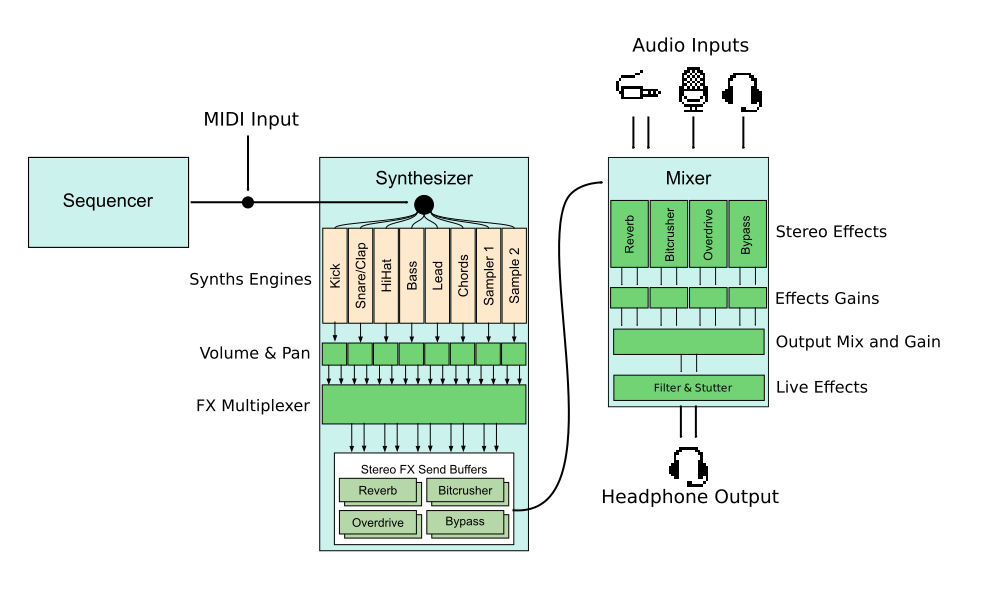
The 8 Tracks
The PGB-1 has 8 internal tracks, each with a dedicated sound type:
Track |
Type |
Description |
|---|---|---|
1 |
Kick |
Bass drum sounds |
2 |
Snare |
Snare and clap sounds |
3 |
Hi-Hat |
Hi-hat and cymbal sounds |
4 |
Bass |
Bass synthesizer |
5 |
Lead |
Lead synthesizer |
6 |
Chords |
Polyphonic chord synthesizer |
7 |
Sampler 1 |
First sample playback track |
8 |
Sampler 2 |
Second sample playback track |
Each track follows the same signal path but has different synth engines available.
Signal Path Stages
1. Step Sequencer
The journey begins with the step sequencer. When a step is active and its conditions are met, it sends a note trigger with:
Note pitch (fixed, from the arpeggiator, or
chord progression) Velocity (how hard the note is
played) Any parameter locks for that
step
2. Synth Engine
The synth engine converts note triggers and parameters into actual audio. Each track type has multiple engines to choose from (sine kicks, FM basses, etc.). The engine produces a mono audio signal.
The LFO (Low Frequency Oscillator) can modulate synth parameters at this stage, creating movement and variation in the sound.
3. Volume and Panning
After synthesis, the audio passes through mixing controls:
Volume control - Sets the track’s loudness in the mix
Stereo panning - Places the sound left, right, or center
The LFO can also modulate volume and panning for tremolo and auto-pan effects.
4. FX Routing
Each track routes to one of 4 effect buses:
Effect |
Description |
|---|---|
Bypass |
No effect applied (clean signal) |
Overdrive |
Adds warmth and distortion |
Reverb |
Adds space and ambience |
Bitcrusher |
Adds digital lo-fi character |
One Effect Per Track
Each track can only use one global effect at a time. Choose the effect that best suits each sound.
Each effect bus has a gain stage at its output controlled from the Project Mixer menu.
5. Final Mix
All 4 effect buses are mixed together into a single stereo output. A last gain stage is available on the stereo output.
6. Live FX
After the final mix, the audio passes through the Live FX stage. These are performance effects controlled in real-time holding Cpy/FX:
Effect |
Description |
|---|---|
Filter |
Sweepable low-pass/high-pass filter applied to the entire mix |
Stutter |
Rhythmic repeat/glitch effect for build-ups and transitions |
Unlike the per-track FX routing, Live FX affect the entire mix and are meant for real-time performance.
Audio Inputs
The PGB-1 has three audio inputs:
Line Input - 3.5mm stereo jack for external audio devices
Internal Microphone - Built-in microphone
Headset Microphone - For use with headsets that have a built-in mic
All three inputs can:
Pass through to the output with one effect applied
Be recorded as samples for the sampler tracks
Audio inputs route to the same FX buses as the internal tracks, allowing you to apply reverb or other effects to incoming audio.
Next Steps
Your First Project - Apply this knowledge to create a beat
Track Settings - Deep dive into synth engines and mixing
Live FX - Learn to control effects during performance