Hardware Layout
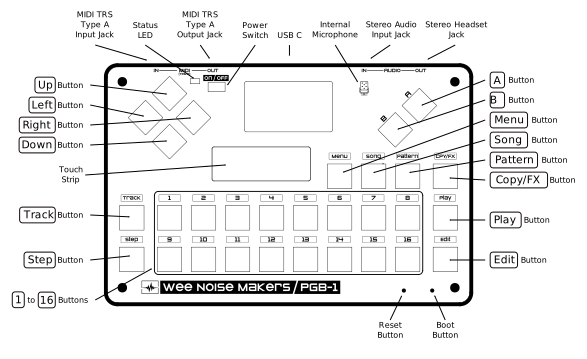
Front Panel
Power
Power Switch (side) - Slide left to turn on, right to turn off
Power On LED (top left, cyan) - Lit when the device is powered on
Battery Charge LED (top left, red) - Lit when the battery is charging
Keyboard Section
The 16 numbered buttons (1 to 16) serve multiple purposes depending on the current mode (see Main Modes).
Touch Strip
The capacitive touch strip at the bottom of the device allows for:
Quick parameter value adjustment
Live performance expression
Connectors
From right to left:
Headphone/headset (3.5mm stereo jack) - Connect headphone/headset or external speakers
Line Input (3.5mm stereo jack) - Connect external audio sources
USB (type-C) - For charging and firmware updates
MIDI Output (3.5mm stereo jack, TRS type A) - Control external gear via MIDI protocol
MIDI Input (3.5mm stereo jack, TRS type A) - Control the PGB-1 with external gear (MIDI keyboard or sequencer, Digital Audio Workstation (DAW), etc.)
Internal Components
Built-in Speaker - For monitoring without headphones
Internal Microphone - For recording samples
Rechargeable Battery - Provides portable operation
Recovery
Reset Button (small hole) - Use a paperclip to reset the device
Boot Button (small hole) - For forced firmware update procedure